P Product
Excalibur
An AI wins-and-corrections assistant built for an enterprise transportation strategy team, designed around stakeholder persona research and decision-tree conversation design rather than a generic chatbot interface.
Type
Product
Core Competency
AI Agent Product Design
600+ hrs
annual manual burden identified
300 hrs
annual hours saved by automation
$22,500
annual direct savings
4
stakeholder personas mapped into decision trees
Context or Challenge
An enterprise transportation strategy team was capturing “wins” and “corrections of error” (COEs) by hand -- scattered across slide decks, email threads, and individual memory. The process consumed more than 600 hours a year and created silos that made it hard for one team to learn from another team's success or mistake.
Observation
The team wasn't short on good work to talk about -- wins and corrections were being documented constantly. The problem was that every stakeholder who needed that information -- transportation managers, replenishment managers, event managers, executives -- had to dig through the same scattered records and translate them into whatever they actually needed to know, every time.
Insight
The real bottleneck wasn't retrieval, it was translation. A generic Q&A tool that just returned raw records would still fail, because a transportation manager and an executive can ask the exact same question and need two completely different, equally correct answers back. The product problem was designing one knowledge base that could reliably tell the difference.
My Thinking
Before writing a single agent instruction, I treated this like a research problem, not a prompting problem. I mapped the actual roles who would use the tool -- their goals, pain points, and vocabulary -- as full personas, then translated that research into a decision tree: detect who's asking (or what shape their question takes) before deciding how to answer. I used the same node-mapping approach on the submission side, so reporting a win took less effort than the tool it was replacing.
What I Built or Led
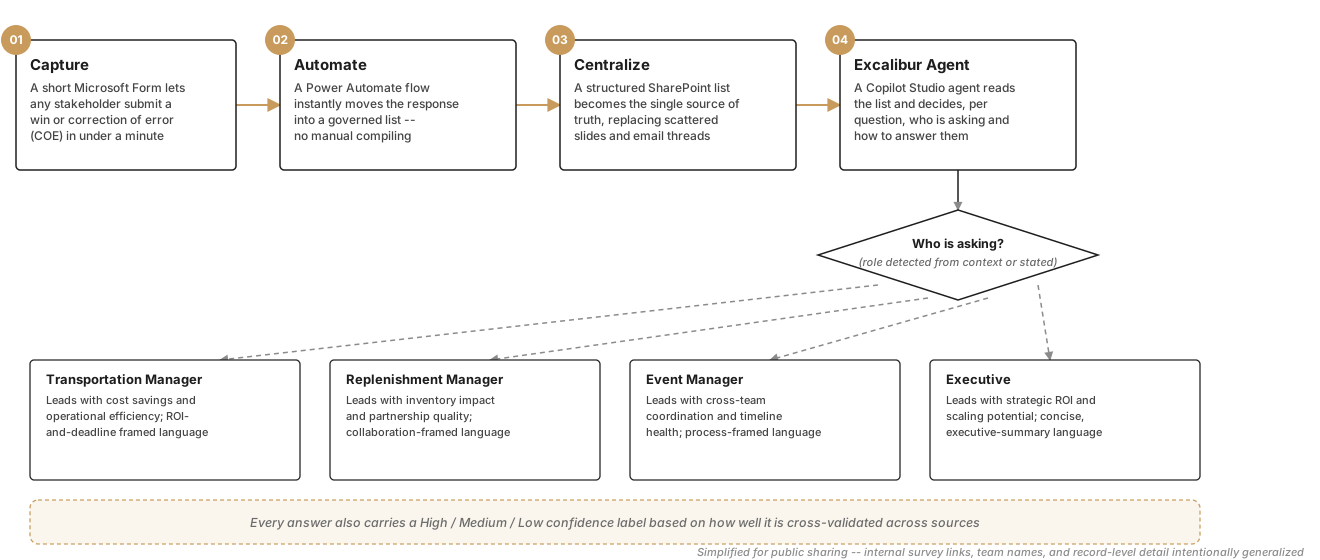
Working with a small cross-functional team, I co-led the design of Excalibur: an intake-to-insight pipeline that turns a short Microsoft Form submission into a persona-adapted answer. The design-thinking process behind that pipeline is shown below.
Featured Capability: Persona-to-Decision-Tree Mapping
- Documented the goals, pain points, collaboration needs, and vocabulary of 10+ distinct operating roles across transportation, merchandising, and replenishment as full working personas
- Distilled that research into a compact decision tree: detect the asker's role → route to that role's information priorities → answer in that role's language, instead of one generic summary for everyone
- Designed a second, parallel decision tree for the submission workflow -- a 3-branch event-type question that routes each submitter straight to the matching intake form instead of one long freeform survey
- Layered a confidence-scoring model (High/Medium/Low) across every answer, so a validated figure and an estimated one are never presented as equally certain
Technology Behind the Tool
- Microsoft Copilot Studio (agent instruction and conversation design)
- Power Automate (event-triggered workflow orchestration)
- SharePoint list (governed, structured data layer)
- Microsoft Forms (branching, guided intake)
- Persona-adaptive decision-tree logic (rule-based routing by stakeholder type)
- Confidence-scored, multi-source validation logic
- Fiscal-calendar-aware temporal query logic
How It Works, Behind the Scenes
The starting point was a stakeholder map, not a chatbot. A Microsoft Form captures each win or correction of error in under a minute; a Power Automate flow instantly moves that response into a governed SharePoint list, replacing manual compiling entirely. A Copilot Studio agent reads that list and, before answering anything, runs a decision tree to detect who's asking -- a Transportation Manager, Replenishment Manager, Event Manager, or Executive -- then routes to that role's information priorities and language style. A parallel decision tree handles new submissions, and every answer the agent gives carries a confidence level based on how well it's cross-validated across sources.
Launch or Adoption Strategy
This was scoped and delivered as a Phase 1 pilot, proposed through an internal AI hackathon rather than a top-down mandate -- the adoption plan was part of the pitch, not an afterthought. It paired short training on the Form/SharePoint/Excalibur workflow with a communication and FAQ rollout and a dedicated support channel, plus a built-in measurement plan (submission volume, usage patterns, and satisfaction feedback) so adoption could be tracked from day one instead of guessed at after launch.
Business Impact
- Identified and targeted 600+ hours of annual manual effort in the existing process
- Projected roughly 300 hours saved per year through automation, an estimated $22,500 in annual direct savings
- Replaced a fragmented, siloed reporting process with a single, governed source of truth
- Shifted associate time from manual compiling toward higher-value trend analysis and decision-making
Key Takeaway
“The hardest part of building a genuinely useful AI assistant isn't the model -- it's the decision tree behind it: knowing exactly which question to ask next, and whose language to answer in.”
Capabilities Demonstrated
- Stakeholder persona research
- Decision-tree / conversation design
- Cross-functional facilitation
- Workflow automation
- AI product design
- Business case development
- Enablement and rollout planning
- Data governance